![Crosschq Logo 534x115.png]](https://support.crosschq.com/hs-fs/hubfs/Crosschq%20Logo%20534x115.png?height=40&name=Crosschq%20Logo%20534x115.png)
When Crosschq emails a reference request to a candidate and the email cannot be delivered, for example because of a typo in the address or an email account that no longer exists, Crosschq lets your team know so you can correct the email and send the request again.
In This Article
- When an Email Cannot Be Delivered
- Updating the Email and Resending the Request
- Who Gets Notified
- When the Undeliverable Flag Does Not Appear
- Requests Sent From an ATS
- If the Email Was Delivered but the Candidate Cannot Find It
When an Email Cannot Be Delivered
If the email Crosschq sent for a request does not reach the candidate, you see the following:
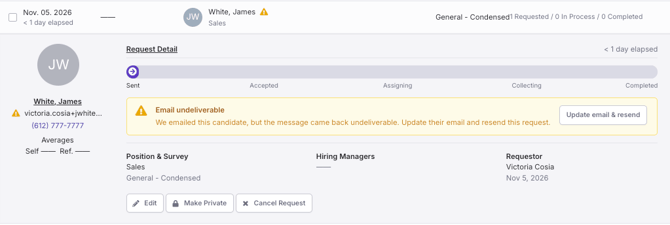
The alert can take a few minutes to appear after the request is sent, because Crosschq waits for the email provider to confirm that the email could not be delivered.
An undeliverable email does not cancel or block the request. The request stays in Sent, and the candidate can still complete it, for example from the text message (SMS) or with the request link.
Updating the Email and Resending the Request
- Open the request from the alert in Action Required, or click Update email & resend in the email.
- Correct the candidate's email.
- Confirm. The same request is sent again to the new email.
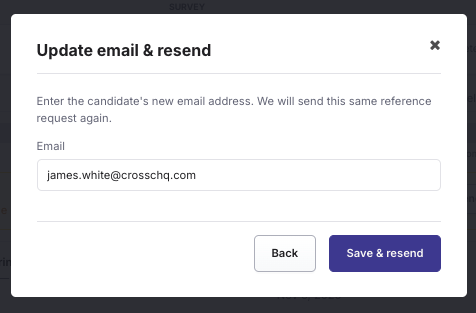
The Undeliverable flag and the alert disappear once the new email is sent. It can take a few seconds to update on screen. If the new email cannot be delivered either, the flag and the alert appear again. In that case, check the email address with the candidate.
If the email is correct but the candidate is no longer available, you can cancel the request instead.
Who Can Update the Email
The requestor, the hiring managers and anyone who can see the full candidate information on an open request can update the email. People who only receive the notification email for information get a View request link and cannot update the email.
If the new email already belongs to another candidate in your organization, the request is linked to that candidate. Nothing changes on that candidate's profile.
Who Gets Notified
| Who | How | Default |
|---|---|---|
| Requestor | Alert in Action Required | Always on |
| Hiring managers | Alert in Action Required | Always on |
| Requestor | On | |
| Hiring managers | Off | |
| Specific users added by an admin | Email with a View request link | No one added |
| Requestor and hiring managers | Slack or Microsoft Teams | Off |
Admins can change these options in the 360 settings, under Notifications to Team Members, in the Undeliverable row. For more information, see Managing Crosschq 360 Settings.
When the Undeliverable Flag Does Not Appear
In some cases, Crosschq does not show the flag or send the notification, even if the email provider reports a problem:
Requests Sent From an ATS
If the request was created from Lever, Greenhouse, Workday, iCIMS, JazzHR, SmartRecruiters, Bullhorn or SuccessFactors, Crosschq also lets your ATS know that the request is undeliverable. Depending on the ATS, this appears as a note, a comment or a status.
Sending the request again does not update the ATS. The undeliverable message stays in your ATS until the request moves to its next status, for example Accepted. The request stays open in Crosschq the whole time.
If the Email Was Delivered but the Candidate Cannot Find It
If there is no Undeliverable flag, the email reached the candidate's inbox provider. Some providers, especially Gmail, occasionally filter Crosschq emails to the spam folder. Ask the candidate to check their spam folder.
Crosschq also sends the request by text message (SMS) when SMS is turned on, so the candidate can open the request from there.
Feel free to reach out to our Support team if you have any further questions.