![Crosschq Logo 534x115.png]](https://support.crosschq.com/hs-fs/hubfs/Crosschq%20Logo%20534x115.png?height=40&name=Crosschq%20Logo%20534x115.png)
- Overview
- How to set up a conditional question
- Rules and limitations
- Examples
- Conditional Questions vs. Delivery Guidance
Overview
Conditional Questions let you route the interview based on a candidate's answer. When enabled on a question, that question is only shown to candidates whose answer to a specific earlier question matches a condition you set — either Answered Yes or Answered No.
This keeps the interview focused: candidates who meet a requirement move on without unnecessary questions, while candidates who do not are asked what you actually need to know.
Conditional Questions are available in the Interview Guide Builder and apply to AI Agent interviews only.
How to set up a conditional question
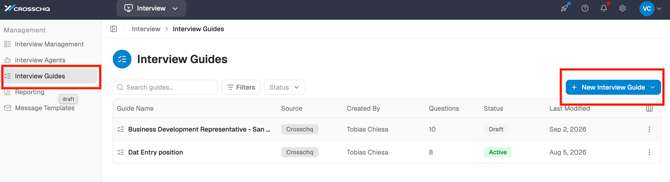
- Navigate to Interview Guides and click New Interview Guide, or open an existing guide to edit it
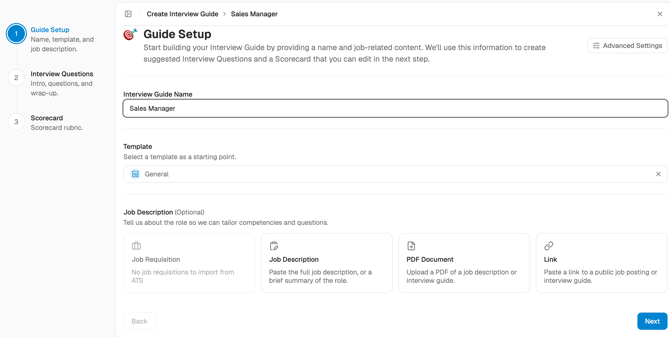
- On the Guide Setup screen, enter an Interview Guide Name and select a Template. Optionally, add a job description to help Crosschq suggest relevant questions. Click Next.
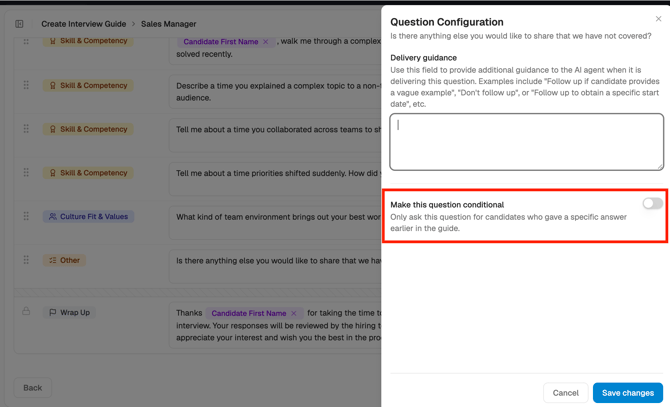
- On the Interview Questions screen, click the Question Config icon (the sliders icon) on the question you want to make conditional.

- In the panel that opens, enable the Make this question conditional toggle.
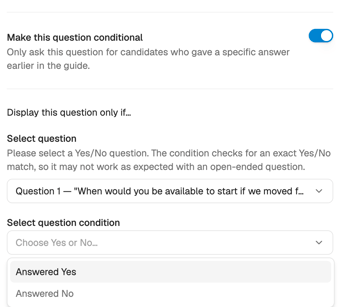
- Under Select question, choose the earlier question this one depends on. Only the closest earlier question that can gate this one is available — that is the question immediately before it in the guide that is a Yes/No question.
- Under Select question condition, choose either Answered Yes or Answered No.
- Click Save changes.
Once saved, the question will only be shown to candidates whose answer to the selected question matches the condition. All other candidates skip it automatically.
Rules and limitations
- Yes/No questions only. A conditional question can only depend on a question that the AI evaluates as a Yes/No answer. Open-ended questions cannot be used as the gating question.
- Closest earlier question only. The gating question must be the closest earlier question in the guide that can gate this one — you cannot select any question further back in the guide.
- One condition per question. Each conditional question depends on a single condition (Yes or No) from a single earlier question.
- AI interviews only. Conditional questions do not apply to human interviews conducted using the meeting bot.
Examples
Location screening
Question 1: "This role is based in Chicago with no relocation assistance available. Can you confirm you're applying for this location?"
→ If No: show Question 2: "Would you be able to self-relocate?"
→ If Yes: skip Question 2 and continue.
Work authorization follow-up
Question 1: "Are you authorized to work in the United States?"
→ If No: show Question 2: "Will you now or in the future require visa sponsorship?"
→ If Yes: skip Question 2 and continue.
Schedule commitment
Question 1: "This role requires being in the office 4 days a week. Are you able to commit to this schedule?"
→ If No: show Question 2: "Could you tell us more about your availability constraints?"
→ If Yes: skip Question 2 and continue.
Conditional Questions vs. Delivery Guidance
Conditional Questions and Delivery Guidance both shape how the interview flows, but they solve different problems.
Use Conditional Questions when the answer to one question changes what you need to ask next — for example, if a candidate says they are not based in Chicago, you want to follow up on relocation, but candidates who are already there should skip that question entirely.
Use Delivery Guidance when you want the AI to push for more detail if the answer is vague — for example, if a candidate's motivation answer does not name anything specific about the role or company.
Example — using both together:
Question 1: "This role is based in Chicago with no relocation assistance. Can you confirm you're applying for this location?" (Yes/No)
→ If No: a Conditional Question appears: "Would you be able to self-relocate?" — with Delivery Guidance set to "Incomplete unless the answer confirms whether they can self-relocate and by when. If that is missing, follow up once, then continue."
→ If Yes: the guide continues to the next question.