![Crosschq Logo 534x115.png]](https://support.crosschq.com/hs-fs/hubfs/Crosschq%20Logo%20534x115.png?height=40&name=Crosschq%20Logo%20534x115.png)
Note: This article covers Fraud Analysis for Crosschq Interview — which evaluates AI Agent interview sessions. If you're looking for fraud detection in reference checks, see Understanding Fraud Risk in Crosschq 360.
- Overview
- How to access Fraud Analysis
- Reading the risk score
- Signal groups
- How to act on results
- How this differs from Crosschq 360 fraud detection
Overview
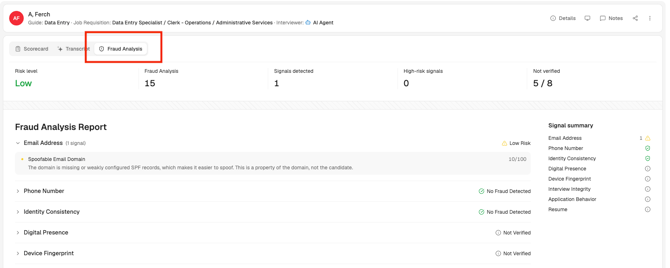
When a candidate completes an AI Agent interview, Crosschq automatically analyzes the session for signals that may indicate the person who took the interview was not the actual candidate, or that outside assistance was used. The analysis happens after the interview finishes, and the risk level it produces also reflects other information about the candidate. The results appear on the Fraud Analysis tab of the Interview Report.
Fraud Analysis is designed to give your team an early signal to investigate further — it does not make a hiring decision automatically.
How to access Fraud Analysis
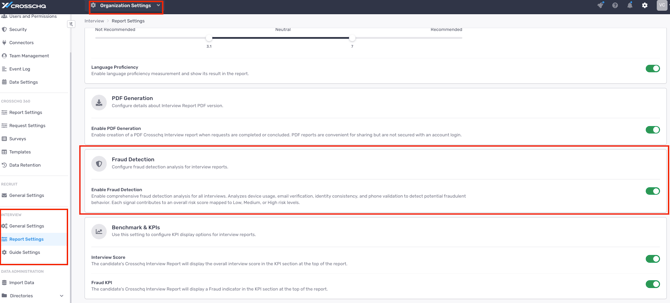
Open any completed AI Agent interview from Interview Management and select the Fraud Analysis tab. Results appear once the interview has finished processing. The tab only appears when your organization has fraud detection enabled in your organization settings.
Reading the risk score
At the top of the Fraud Analysis tab, a gradient bar shows the overall risk level for the candidate, ranging from low risk on the left to high risk on the right.
Important: A high risk score does not confirm that fraud occurred. It means the analysis produced patterns worth reviewing. Always look at the full picture — responses, scorecard, and other information — before making a decision.
Signal groups
Below the risk bar, the tab shows signal groups — the categories of signals Crosschq evaluates, named the same way in the report. The first covers the interview itself; the rest cover the candidate's application, and all of them feed the same risk level. Each group needs its own data — a group with nothing to work with is reported as unevaluated and does not count toward the level.
How to act on results
- Low risk: No action required. Continue your normal review — but confirm the interview section actually reports a result.
- Medium risk, single group flagged: Review the signal group description. Many medium signals have benign explanations — poor image quality or unusual lighting for the image, and rehearsed or formal phrasing for the answers. Use your judgment alongside the rest of the report.
- High risk or multiple groups flagged: Consider reaching out to the candidate to verify their identity through another channel before advancing them in the process.