![Crosschq Logo 534x115.png]](https://support.crosschq.com/hs-fs/hubfs/Crosschq%20Logo%20534x115.png?height=40&name=Crosschq%20Logo%20534x115.png)
What is an Interview Plan?
An Interview Plan is the template that defines the structure of an interview: which competencies to evaluate, which questions to ask under each competency, what scoring scale to use, and what instructions to give the interviewer. It is reusable — the same plan can power multiple interviews, be used by both AI agents and human interviewers, and be shared across your team.
Think of the plan as the recipe, and the scorecard as the filled-in form.
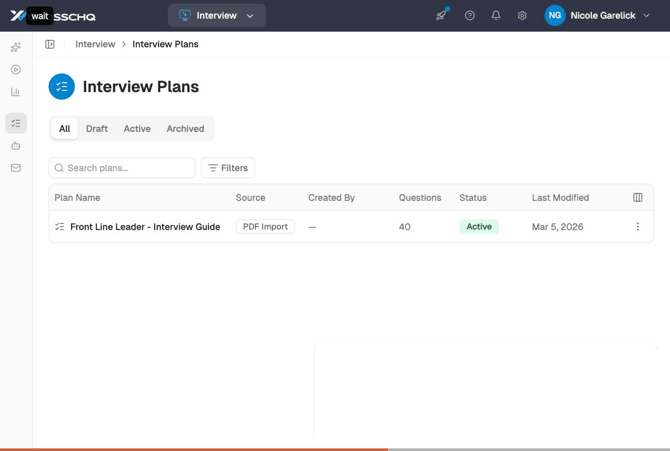 The Interview Plans library: the Front Line Leader - Interview Guide plan is listed with its source (PDF Import), 40 questions, Active status, and last modified date. Tab filters for All, Draft, Active, and Archived plans appear at the top.
Creating an Interview Plan
There are three ways to create a plan, all accessed from the + New Interview Plan dropdown on the Interview Plans page.
Build manually
Start with a blank plan and add competencies and questions one by one. For each competency you can write a description, add questions, and set rubric anchor text for each score level on the rating scale.
Import from a PDF
Upload an existing interview guide PDF and Crosschq will parse it into a draft plan automatically. You can review and edit the draft before publishing.
Import from Quintela
Browse Quintela's catalog of pre-built interview plans, filtered by region, leadership level, discipline, brand, and language, and pull one into your library as a starting point.
Draft and published plans
Every plan starts as a draft. Draft plans cannot be selected when creating a new interview or configuring an Interview Agent. Open the plan and click Publish to make it available.
Inside a plan: competencies, questions, and rubric
Each plan is organized into competencies. Under each competency, you'll find the interview questions and a scoring rubric — the written description of what each score level means for that competency.
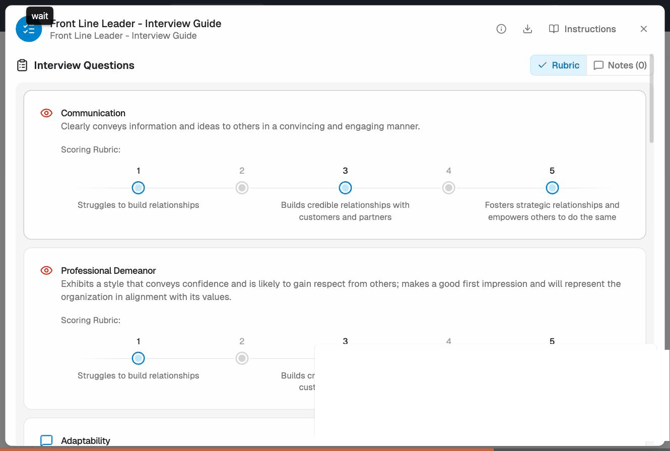 The Front Line Leader - Interview Guide open in detail view: the Communication competency shows a 1–5 scoring rubric with anchor text at levels 1, 3, and 5. The Rubric and Notes toggles are visible in the top-right corner. Professional Demeanor appears below with the same rubric format.
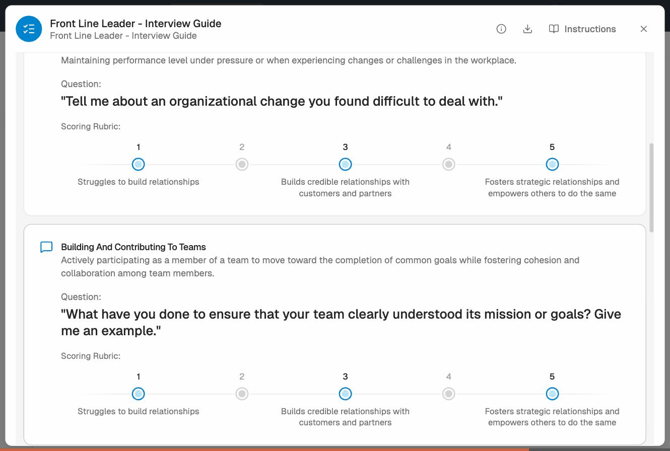 Interview questions from the plan: "Tell me about an organizational change you found difficult to deal with." (Adaptability) and "What have you done to ensure that your team clearly understood its mission or goals?" (Building and Contributing to Teams). Each question has a 1–5 scoring rubric with anchor text below it.
Scorecards
A scorecard is generated automatically from the Interview Plan when an interview is conducted. Human interviewers fill them in manually; AI agents generate them automatically from their analysis of the candidate's responses. The completed scorecard is what appears in the Interview Report.
Scorecard view options
Two toggles in the plan/scorecard view let you control what's displayed:
| Toggle | What it does |
|---|---|
| Rubric | Shows or hides the rubric anchor text for each score level on the rating scale. |
| Notes | Shows or hides interviewer notes. A count badge shows how many notes are hidden. |
Selectable questions
When using an AI Agent interview, you can select a subset of questions from the plan for the AI to focus on — useful when you want to emphasize certain areas without creating a separate plan. Question selection happens when configuring the Interview Agent.
Managing your plan library
- Plans are shared across your organization. Anyone with the right permissions can see and use all published plans.
- Editing a published plan does not retroactively change completed interviews — past scorecards always reflect the version in use at the time.
- The backend sometimes refers to plans as "interview guides" — this is the same thing.