![Crosschq Logo 534x115.png]](https://support.crosschq.com/hs-fs/hubfs/Crosschq%20Logo%20534x115.png?height=40&name=Crosschq%20Logo%20534x115.png)
Migrating to Greenhouse API V3
Table of Contents
360 Customers
Prerequisites
You must have admin access to your Crosschq account to complete this migration. This step must be completed by a Greenhouse Site Admin. If the Authorize using a service account checkbox does not appear during the authorization flow, the logged-in Greenhouse user does not have Site Admin permissions — no data will be available in TalentWall until the authorization is completed by a Site Admin.
Steps
- Log in to Crosschq and navigate to Settings > Integrations > Greenhouse.
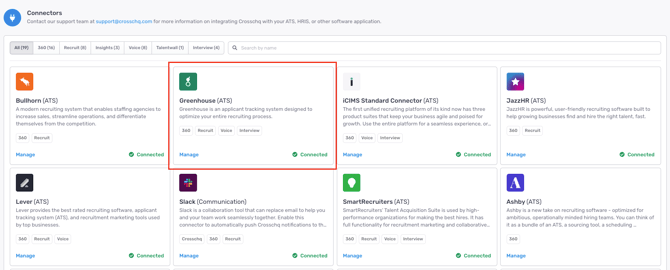
- An Action Required indicator will be displayed on the Greenhouse settings page. Click View Changes.

- You will be redirected to the Greenhouse authorization screen. Enter your Greenhouse account email and click Log in to Greenhouse. If you are not already logged in to Greenhouse, you will be prompted to do so before completing the authorization.
- Grant the required permissions when prompted.
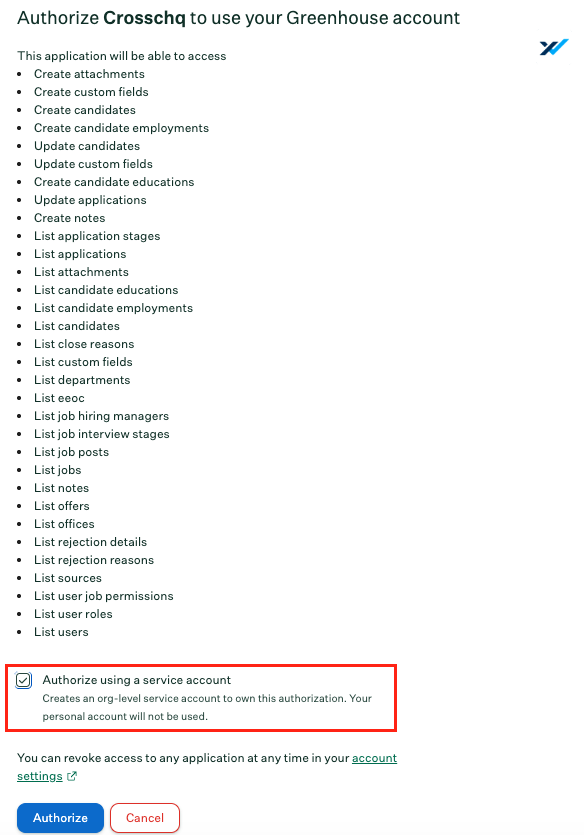
- Once OAuth authorization is complete, the new API will be enabled automatically.
TW Customers
Prerequisites
You must have admin access to your Crosschq TalentWall account to complete this migration. This step must be completed by a Greenhouse Site Admin.
Steps
- In TalentWall, click your profile icon in the top-right corner and select Account Settings.
- Navigate to the ATS Connection tab.
%2019.34.29.png?width=670&height=273&name=Captura%20de%20pantalla%202026-07-23%20a%20la(s)%2019.34.29.png)
If your account is still on V1, the section will display Migrate to Greenhouse Harvest v3. If your account has already been migrated, it will display Greenhouse OAuth.
- Click the Greenhouse button to start the authorization process.
- You will be redirected to the Greenhouse authorization screen. Enter your Greenhouse account email and click Log in to Greenhouse.
%2019.34.45-1.png?width=670&height=215&name=Captura%20de%20pantalla%202026-07-23%20a%20la(s)%2019.34.45-1.png)
%2019.36.51.png?width=670&height=224&name=Captura%20de%20pantalla%202026-07-23%20a%20la(s)%2019.36.51.png)
- Review the permissions requested by TalentWall by Crosschq and click Authorize.
%209.38.49.png?width=670&height=623&name=Captura%20de%20pantalla%202026-07-30%20a%20la(s)%209.38.49.png)
Once authorization is complete, TalentWall will display a confirmation message: Greenhouse V3 connected. Import started; data will be available shortly.
%2019.36.28.png?width=670&height=301&name=Captura%20de%20pantalla%202026-07-23%20a%20la(s)%2019.36.28.png)
FAQ
When does Greenhouse V1 get deprecated?
Greenhouse is scheduled to deprecate API V1 by July 2026. Complete the migration before that date to avoid service interruptions.
What happens if I don't migrate?
Once Greenhouse deprecates V1, the existing integration will stop functioning. Data will no longer sync between Greenhouse and Crosschq.
I'm in legacy TalentWall — can I still migrate?
Greenhouse V3 is not supported on the legacy TalentWall platform. You must migrate to Crosschq first.
Support
For additional assistance, contact support@crosschq.com.