![Crosschq Logo 534x115.png]](https://support.crosschq.com/hs-fs/hubfs/Crosschq%20Logo%20534x115.png?height=40&name=Crosschq%20Logo%20534x115.png)
- Overview
- What is redacted
- What is not redacted
- Redaction in the report
- FAQ
Overview
When a candidate completes an AI interview, Crosschq automatically removes certain categories of sensitive information from the transcript before it is passed to the scoring algorithm. This process — called redaction — is designed to prevent bias from influencing how candidates are evaluated.
Redaction only applies to AI interviews. Interviews conducted by a person using the meeting bot do not go through redaction — the transcript for those interviews always shows the original text.
Redaction happens in two distinct contexts:
- Scoring: The transcript sent to the grading model always has sensitive information removed. This cannot be turned off.
- Report: Whether sensitive information is visible in the report transcript and the downloadable PDF is controlled by two separate settings, each with its own default. See Redaction in the report below.
What is redacted
Crosschq removes the following categories of information from the transcript before scoring. This list is exhaustive — anything outside these categories stays in the transcript. Redacted content is replaced with ****.
Identity and bias signals
Direct identifiers
Profanity
Profanity is handled separately from the bias-related categories. It is masked with asterisks, with the first letter kept (e.g. f***).
What is not redacted
The following information is never removed from the transcript:
- The candidate's own name
- Company and brand names (the hiring company or any other organization)
- School names
- Job titles
- Work locations and home or postal addresses
- Employment dates and years of experience
- Start dates and availability
- Salary and compensation amounts
Disability, neurodivergence, mental health conditions, pregnancy status, and sexual orientation are not currently redacted.
Redaction in the report
The transcript used for scoring always has sensitive information redacted — this cannot be changed.
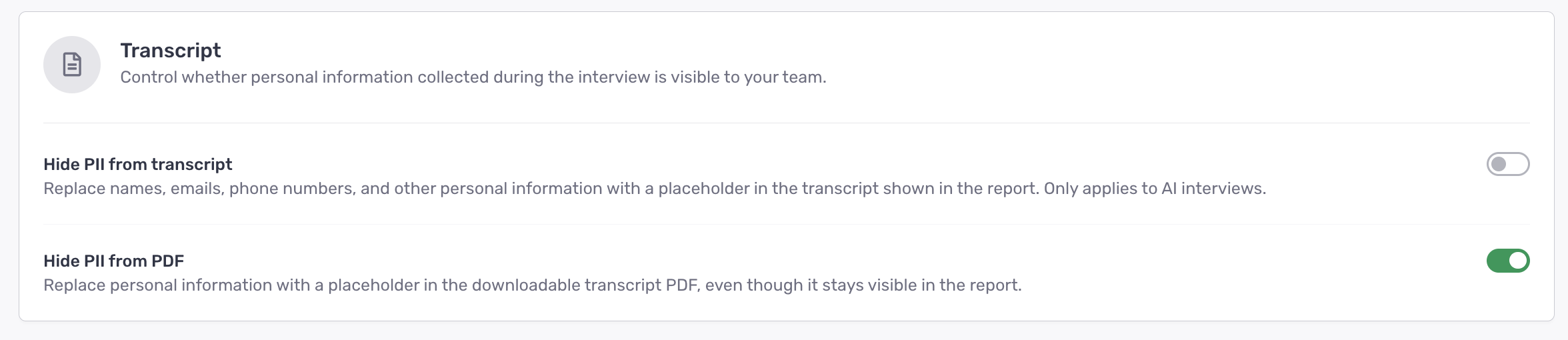
For the Interview Report, there are two separate settings that control what is visible in the report transcript and the downloadable PDF. Both are available under Organization Settings > Interview > Report Settings (Guides) in the Transcript section.
The two settings are not fully independent. When Hide PII from transcript is turned on, the PDF is always hidden as well and the Hide PII from PDF toggle is removed from the screen.
AI-generated summaries in the report are always based on the redacted transcript, regardless of these settings. The video and audio recording are never affected — you will always hear the original content.
FAQ
Does redaction affect how the candidate is scored?
Yes — redaction always happens before scoring. The grading model only ever sees the redacted transcript, which means information like gender, age, or ethnicity cannot influence the score.
Can I see the unredacted transcript in the report?
Yes. By default, the transcript in the report shows the original text. If your organization has turned on Hide PII from transcript, sensitive information will be replaced with **** in the report view. The video and audio always show the original content regardless of the setting.
Why does a screening question about work authorization show a blank answer in the report?
If a candidate answers a work authorization question by stating their citizenship (e.g. "I am a US citizen"), that response will be redacted because citizenship falls under the Nationality category. Crosschq is working on an approach that preserves the intent of the answer (yes/no) without passing the protected attribute to the scoring model.
Will disability or pregnancy status be redacted in the future?
Crosschq is reviewing a feature that would let organizations select which additional categories are redacted from the transcript in the report. Crosschq will always control what is redacted before the grading algorithm runs — customers will not be able to change that.
Are home addresses redacted?
No. Home and postal addresses are not currently part of the redaction list.