![Crosschq Logo 534x115.png]](https://support.crosschq.com/hs-fs/hubfs/Crosschq%20Logo%20534x115.png?height=40&name=Crosschq%20Logo%20534x115.png)
Crosschq 360 includes built-in fraud detection capabilities designed to help hiring teams identify potential risks before making an offer. These features surface signals across three dimensions: reference legitimacy, reference concerns, and suspicious activity, and present them directly within the candidate's report.
Overview
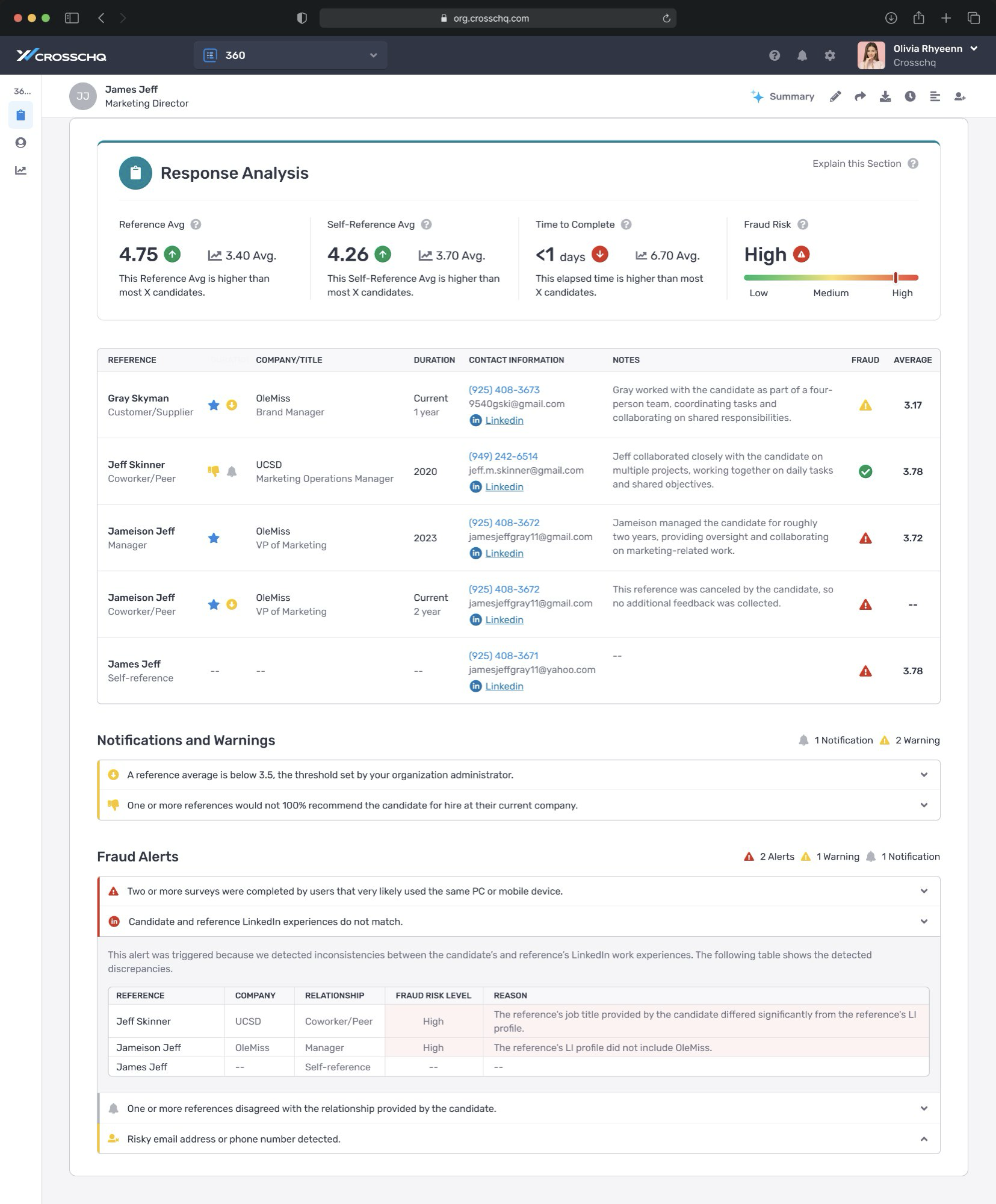 When a reference check is complete, the Response Analysis section of the report displays a Fraud Risk indicator in the top-right corner. This indicator reflects the overall risk level detected for that candidate's reference check.
The Response Analysis view, showing the Fraud Risk indicator (top right), the reference list with per-reference fraud icons, Notifications and Warnings, and the Fraud Alerts section.
|
Fraud Risk is displayed as Low, Medium, or High, with a color-coded gauge (green → yellow → red). A High rating means one or more significant risk signals were detected and the report warrants closer review. |
The fraud signals Crosschq evaluates fall into three categories:
|
Dimension |
What It Covers |
Examples |
|
Reference Legitimacy |
Verify the reference is real |
Email & phone intelligence, LinkedIn work history, identity verification (optional) |
|
Reference Concerns |
Surface red flags from survey responses |
Termination alerts, ethics concerns, refusals, relationship disputes |
|
Suspicious Activity |
Identify technical manipulation signals |
Shared devices, shared IP addresses, incognito/VPN browsing |
Fraud Alerts in the Report
Fraud Alerts appear in a dedicated section near the bottom of the Response Analysis view. Alerts are classified by severity:
- 🔴 Alert (red) — high-confidence signals more likely to indicate manipulation, such as two or more surveys completed on the same device
- 🟡 Warning (yellow) — lower-confidence signals that warrant attention but often have legitimate explanations, such as a shared IP address (e.g., candidate and reference in the same office)
- 🔔 Notification (grey) — informational items that are not fraud indicators on their own but may be relevant in context
|
If a same-device alert (red) is present, we recommend reaching out directly to the reference by phone to verify their identity and relationship to the candidate. |
Common Fraud Alerts
|
Alert |
Severity |
What It Means |
|
Two or more surveys completed on the same device |
🔴 Alert |
Multiple respondents (e.g., the candidate and a reference) used the exact same PC or mobile device. This is the most significant fraud signal. |
|
Candidate and reference LinkedIn experiences do not match |
🔴 Alert |
Crosschq compared LinkedIn work histories and found inconsistencies — such as a differing job title or a company not appearing in the reference's profile. |
|
Shared IP address detected |
🟡 Warning |
Multiple participants completed surveys from the same IP. This can happen legitimately (e.g., same office network) but is worth noting. |
|
Risky email address or phone number detected |
🟡 Warning |
The contact details provided have characteristics associated with fraud risk, such as a disposable email domain or a VoIP number. |
|
One or more references disagreed with the relationship |
🔔 Notification |
A reference indicated their relationship to the candidate differs from what the candidate described. |
|
One or more references would not fully recommend the candidate |
🟡 Warning |
A reference indicated they would not 100% recommend the candidate if their company were hiring for a similar role. |
Reading the Reference List
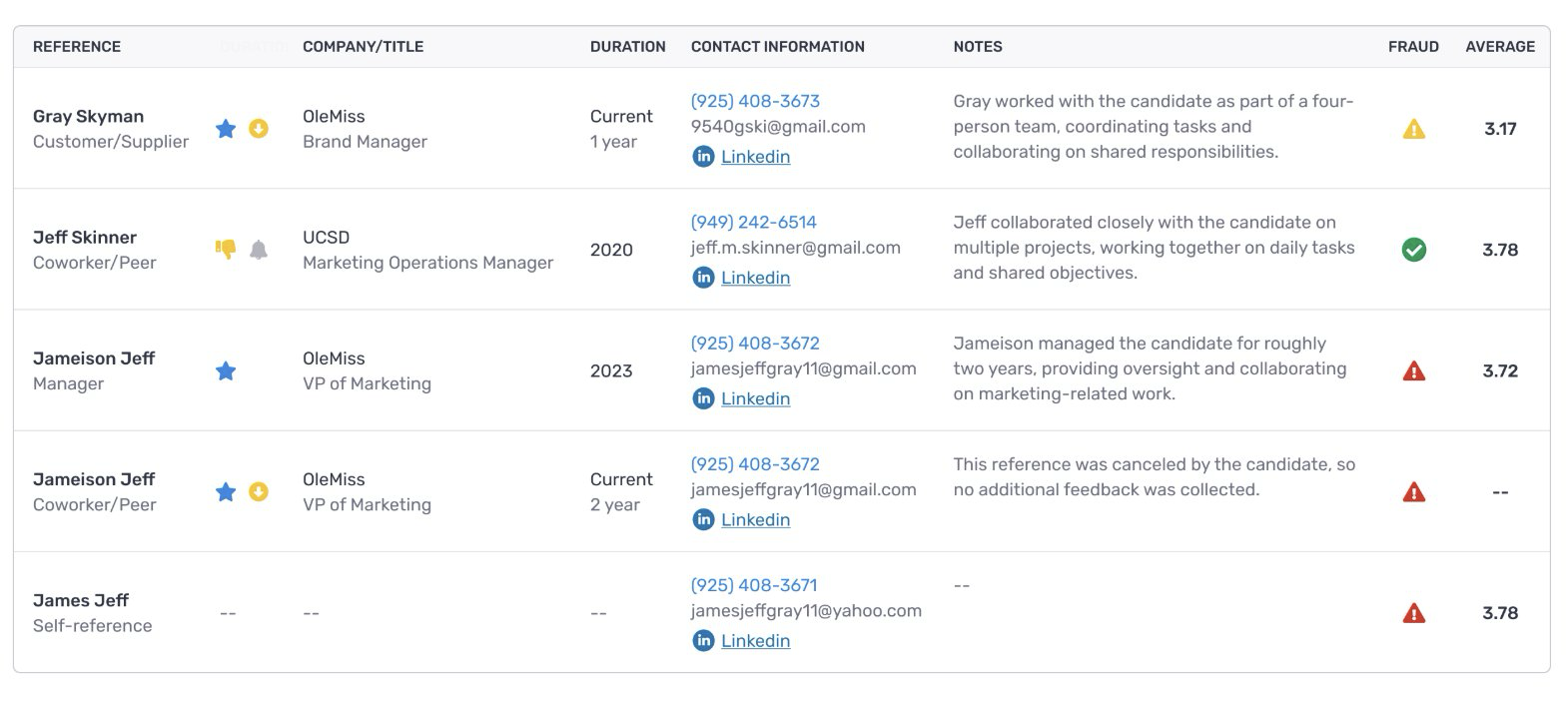
Each reference in the list has a fraud icon in the Fraud column that indicates whether any signals were detected for that individual:
- 🟢 Green checkmark — no fraud signals detected for this reference
- 🟡 Yellow triangle — a warning-level signal was detected
- 🔴 Red triangle — an alert-level signal was detected
The reference list, showing per-reference fraud icons in the Fraud column. Gray Skyman and Jameison Jeff both show yellow warnings; James Jeff (self-reference) shows a red alert; Jeff Skinner shows a green checkmark.
Email & Phone Intelligence
For both the candidate and each reference, Crosschq runs contact details through a fraud-detection API that analyzes metadata signals associated with the provided email address and phone number.
Results appear as color-coded verification icons next to each participant's name in the reference list (see above). Hover over the icon or expand the Notifications, Alerts & Warnings section to see the specific signals that triggered the flag.
Signals evaluated include whether the email address is associated with a disposable domain, whether the phone number is a VoIP or temporary number, and other indicators of inauthentic contact information.
LinkedIn Work History Check
Crosschq automatically compares the LinkedIn work histories of the candidate and each reference against the information provided in the reference check survey. The goal is to verify that the stated working relationship, job titles, and employment dates are consistent with what is publicly documented on LinkedIn.
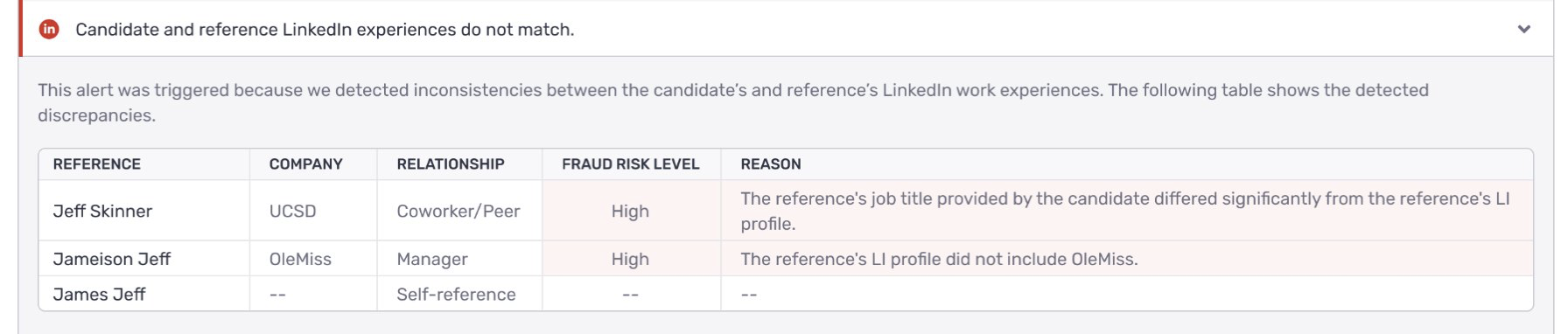
The LinkedIn mismatch alert, expanded to show which references triggered a flag, the specific company, the detected risk level, and the reason for the discrepancy.
How Crosschq Finds and Validates LinkedIn Profiles
For the candidate — if a LinkedIn URL is included in the resume: Crosschq uses that URL directly and scores it based on URL/vanity URL structure, name match, and email match where available.
For the candidate — if no LinkedIn URL is present: Crosschq runs a discovery workflow that searches Google using the person's first name, last name, job title, company history, and the term "LinkedIn." Email is not included in the query.
For references: A similar approach is used, drawing on the contact information provided by the candidate and the reference's own survey responses.
Profile Validation Steps
- URL scoring: The URL is evaluated based on its structure, name match, and available email match.
- Discovery agent: If no URL is available, a discovery agent reviews Google results and filters likely matches based on the person's identity and work history.
- Final selection: A picker agent selects the single best-matching LinkedIn URL and assigns it a confidence score from 0.0 to 1.0.
- Confidence threshold: Crosschq only accepts a profile when the confidence score is 0.75 or higher. Profiles below this threshold are not used.
- Auditability: The model's reasoning and supporting metadata behind each selection are saved for explainability and audit purposes.
What Crosschq Compares
- Whether the candidate and reference appear to have worked at the same company during overlapping time periods
- Whether the reference's job title matches what the candidate provided
- Whether the stated company appears in the reference's LinkedIn work history at all
|
If discrepancies are found, a "Candidate and reference LinkedIn experiences do not match" alert appears in the Fraud Alerts section with a breakdown table showing the affected reference, company, risk level, and reason. |
How to Interpret Fraud Alerts
Fraud alerts are designed to prompt further review — not to make a hiring decision automatically. Here is how to approach them:
- Review the full picture: A single warning on its own is not necessarily a reason for concern. Look at the combination of signals alongside the overall reference scores.
- Same-device alerts (red): The most significant technical signal. Reach out to the reference directly by phone to verify their identity.
- LinkedIn mismatches: Consider whether the discrepancy has a reasonable explanation (e.g., a recently changed title, or a company listed under a slightly different name). When in doubt, follow up with the reference.
- Overlapping signals: When fraud alerts appear alongside a below-average reference score or other warnings, it may be worth pausing the process to gather more information before moving forward.
Notifications and Warnings
In addition to Fraud Alerts, the Notifications and Warnings section surfaces reference-based concerns that are not necessarily fraud-related but may still affect your hiring decision:
- A reference average that falls below your organization's configured threshold
- One or more references indicating they would not fully recommend the candidate at their current company
These are configurable. Your organization administrator can adjust the threshold and enable or disable specific notifications in Organization Settings.
Need Help?
If you have questions about a specific fraud alert on a candidate report, or want guidance on how to interpret a high-risk result, contact Crosschq Support at support@crosschq.com.